Balloon Pop Kids Learning Game
- 4.3
- Rating
- 5.00M
- Installs
- Free
- Price
 Analysis by App-foxy
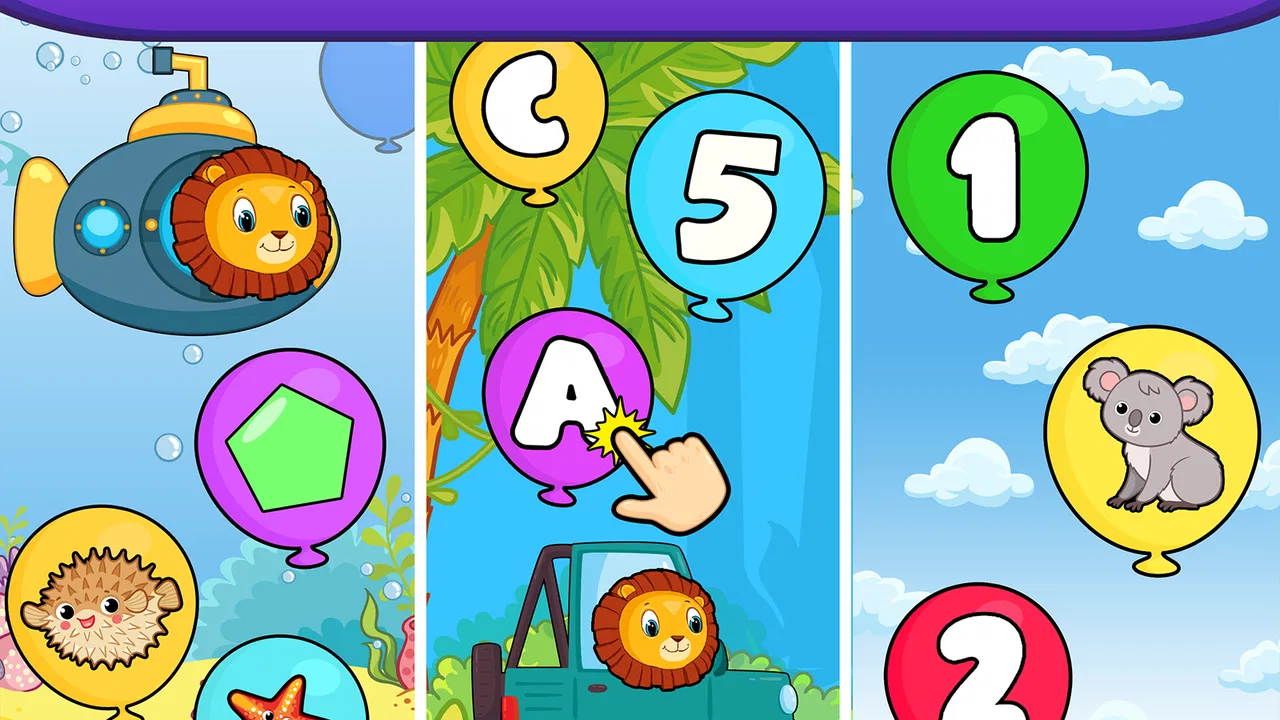
Balloon Pop Kids Learning Game is the kind of educational game I would put on a young child’s device when I want a short, cheerful activity rather than a demanding lesson. Its central idea is simple: children interact with balloons while becoming familiar with early learning topics such as numbers, letters, and shapes. That simplicity is its biggest strength. A child can understand the basic action quickly, and a parent does not need to explain a complicated menu before the first useful moment.
I reviewed it as a preschool-focused game from Bebi Family: preschool learning games for kids, and I found that its appeal comes from turning repetition into play. It is free to download, rated for Everyone, and has built a large audience, with more than five million installs and an average rating of 4.4 from roughly forty-five thousand ratings. Those figures do not replace personal judgment, but they do suggest that the format works for many families looking for an accessible early-learning activity.
What to expect when you open the game
The first thing to understand is that this is not a full preschool curriculum. It is a collection of lightweight learning moments built around balloon-popping play. That makes it useful between meals, during a quiet break, or when a child wants something interactive without moving into a complex adventure game. I would describe it as a practice tool with a playful surface, not as a replacement for reading together, counting physical objects, drawing, or speaking with a child.
You May Also Like

 Blood Strike: 2.5 Anniversary
Blood Strike’s Loadouts Turn Every Drop Into a Tactical Gamble
A close look at Blood Strike’s custom loadouts: how fast access to signature weapons reshapes its battle royale rhythm, rewards preparation, and narrows the gap between fights.

 Pandora - Music & Podcasts
Pandora’s Music Is Easy to Start, but Harder to Recover
Pandora’s strength is its low-effort path from a seed to a station. Its weak spot is how much confidence it asks you to place in connection, setup, and quiet recovery.

 8 Ball Pool
 Is Built on Rivalries, Rematches, and Routine
A close look at the rivalries, rematches, shared routines, and unanswered safety questions that turn a quick pool match into a persistent mobile community.

 Samsung Music
’s Quiet Strength Is Playing What You Already Own
Its reach comes less from spectacle than from dependable access to a personal library. That simplicity is both the app’s strongest retention engine and its ceiling.

 AccuWeather: Weather Radar
AccuWeather Review: A Quick, Clear Forecast for Everyday Decisions
For everyday plans, the best forecast is the one you can understand quickly. AccuWeather makes rain timing, radar, and local conditions easy to act on, with a few trade-offs.

 Hill Climb Racing
Why Hill Climb Racing Still Turns Crashes Into One More Run
A tiny car, a bumpy hill and one more upgrade: Hill Climb Racing keeps resurfacing because its simple chaos makes every near-miss feel personal.
More From Our News Desk



The educational focus is especially suitable for children who are beginning to recognize visual symbols. Letters, numbers, and shapes are easier to approach when the child can respond with a direct touch instead of having to type, read instructions, or navigate several screens. The action also gives the child an immediate result, which helps maintain attention during very short sessions.
That said, parents should set expectations carefully. Popping balloons can reinforce recognition, but recognition is only one part of learning. A child may become faster at identifying a symbol on screen without automatically understanding how that letter sounds or how that number relates to a group of objects. I use this game as a starting point for conversation: after a round, I might ask the child to find the same shape on a toy or count a few blocks nearby.
The game’s free entry is helpful for trying it with a child before deciding whether it belongs in the regular routine. It also includes in-app purchases ranging from $1.49 to $49.99 per item, so I recommend that adults check the purchase settings on the device before handing it over. The free download makes testing straightforward, but “free” does not mean every optional part of the experience is necessarily included without cost.
Its age rating of Everyone makes it approachable for a broad family audience, although the practical fit still depends on the individual child. A toddler who is just learning to tap may enjoy the visual response, while an older preschooler may need an adult to turn each activity into a deeper question. The rating tells me the content is broadly suitable, not that every child will find the learning level equally challenging.
Getting through the first setup without overthinking it
For a first-time user, I would keep the setup calm and brief. Install the game, open it when you have a few uninterrupted minutes, and let the child watch the first screen before taking over. Young children often learn the controls by observing one successful action, so a long explanation can make the experience feel harder than it is.
I also recommend opening it once without the child present. This gives you a chance to see how the opening screen is arranged, notice where the learning activities are located, and review any purchase prompts before a small finger starts tapping. That short preview is one of the most useful habits with preschool apps because it prevents the adult from discovering the interface at the same time as the child.
The current version is 19.01.15 and it requires Android 6.0 or later. If you are preparing an older family phone or tablet, checking the operating system first can save time. On a compatible device, I would still make sure the screen is clean and that the child can comfortably reach the interactive area. A small practical detail like this matters more than it sounds: missed taps can look like a learning problem when they are really just a device-position problem.
Because the game is designed around simple visual actions, I would avoid placing the device too far away or expecting a child to play while walking around. A stable surface and a seated position make it easier to see the symbols and notice what changes after each tap. This is also a good way to keep the session focused instead of turning it into random screen tapping.
The first meaningful success
The first success I look for is not a long session. It is one moment when the child recognizes what to do, makes the correct tap, and understands that the result came from their own action. I would demonstrate one balloon, then pause and let the child try. If the child succeeds, I would name what appeared rather than immediately rushing to the next screen: “That is a circle,” or “You found the number.”
This small pause changes the activity from reflex play into guided learning. The game supplies the visual prompt and the satisfying response, while the adult supplies language and context. If the child makes a wrong choice, I would avoid correcting every tap. Instead, I would point out one feature such as the outline, color, or symbol and invite another try. The goal is to keep the child willing to explore.
A useful routine is to choose one topic at a time. If the child is working with shapes, I might put a real cup, block, or book nearby and connect the on-screen shape to something in the room. With numbers, I might count snacks or toy cars after the game. With letters, I might link a familiar letter to the child’s name. These follow-up actions are where the game becomes more valuable than a few minutes of isolated tapping.
I would keep the first session short even if the child is enthusiastic. Stopping after a clear success can make it easier to return later, while continuing until attention disappears may leave the child frustrated. The best sign that the game is working is not that the child stays on it for a long time; it is that the child can explain or demonstrate one thing learned after closing it.
Another practical tip is to let the child use one finger and tap deliberately. Some children initially swipe across the screen or hit several balloons at once. Rather than treating that as failure, I would model a slower tap and use encouraging language. The game’s uncomplicated interaction makes this kind of motor practice possible, but the adult still needs to guide the pace.
Where first-time users may become confused
The biggest possible confusion is assuming that every balloon-popping moment has the same educational purpose. The playful action may feel consistent, but letters, numbers, and shapes require different kinds of support. A child can identify a shape visually, recognize a number symbol, or notice a letter without understanding the broader concept. I would not measure progress only by speed or by how many balloons are cleared.
Another point to watch is accidental progression. Preschoolers often tap quickly because the animation is exciting, and they may move forward before looking carefully at the next prompt. Sitting beside the child for the first few sessions helps you see whether the game is encouraging recognition or merely encouraging rapid tapping. If it is the latter, slow the rhythm with questions: “What do you see?” and “Which one matches?”
Parents may also wonder whether the game can be used independently. In my view, it can support brief independent play once the child understands the basic interaction, but the learning value is stronger when an adult checks in. A child who needs help reading, choosing an activity, or understanding a mistake may become dependent on guessing if no one is nearby. I would treat unsupervised use as a convenience, not the ideal learning method.
The purchase structure is another reason to supervise the first launch. Since optional items can cost from $1.49 up to $49.99, I would not leave a child to explore payment-related screens alone. This is not a criticism of the learning idea itself, but it is an important part of using a free educational game responsibly. Device-level purchase controls are worth setting before the game becomes part of a daily routine.
Some children will also find the activity too repetitive. Repetition is useful for early recognition, but a child who already knows basic letters and shapes may quickly want something that asks them to trace, spell, count groups, or solve simple problems. In that situation, I would use this game as a warm-up and move to hands-on activities or a more advanced educational app rather than expecting it to provide all the challenge.
How it compares with familiar preschool alternatives
Compared with flashcards, Balloon Pop Kids Learning Game is more interactive and may be easier to keep engaging for a child who loses interest in static pictures. The trade-off is that physical flashcards are easier to combine with conversation, pointing around the room, and sorting real objects. I see the game as a convenient digital prompt, while flashcards remain better when I want to control the pace and ask open-ended questions.
Compared with tracing apps, it offers a gentler introduction to symbols but less direct practice with writing movements. A child preparing to hold a pencil will eventually need drawing, tracing, and physical manipulation. Balloon popping can support recognition and attention, yet it should not be mistaken for handwriting preparation.
Compared with larger preschool suites, its narrow balloon-centered approach may feel less overwhelming. A broad learning platform can offer more subjects and progression, but it may also present more menus, rewards, and distractions. I prefer this game when I want one simple activity that a young child can understand quickly. I would choose a broader suite when I need a more structured routine across language, mathematics, creativity, and memory practice.
The no-ads positioning in the store summary is a particularly useful part of its appeal for family use. It suggests an experience designed to avoid ordinary advertising interruptions, which is valuable when a child is learning to focus. Even so, I would still supervise the interface because advertising and purchase controls are separate concerns, and the presence of in-app purchases makes adult setup sensible.
Who will get the most from it
I think this game is a good match for families with a preschooler who enjoys bright, immediate interactions and is starting to recognize basic symbols. It is also useful for a parent who needs a quick activity that can fit into a small gap in the day. For example, while waiting for an appointment, I could let a child complete a short activity, then use the surrounding environment to continue the lesson by finding circles, counting chairs, or spotting letters on signs.
It can also help a child who is hesitant about formal learning. The game does not begin with a worksheet or a demand to produce a written answer. A successful tap gives the child a low-pressure entry point, and that confidence can make it easier to try a more demanding activity afterward.
I would be more cautious if the child has difficulty with touch controls, becomes overstimulated by animated feedback, or needs detailed explanations for every answer. In those cases, a quiet physical activity with an adult may be a better first choice. I would also skip relying on it as the main tool for children who are already beyond basic recognition; they are likely to need richer challenges than balloon popping can provide.
The developer, Bebi Family: preschool learning games for kids, clearly focuses on early-childhood play, and the game’s design fits that audience. Its popularity is substantial, with around 6.6 thousand written reviews in addition to its larger rating count, but I still recommend judging it by your child’s response. Some children learn best through touch and repetition; others need stories, music, movement, or real objects.
A practical routine after the first day
Once the child understands the basic action, I would create a simple three-part routine: one short game session, one spoken question, and one real-world follow-up. The question might be “Which shape did you see?” The follow-up could be finding that shape in the kitchen. This keeps the screen activity from becoming the entire lesson and gives the child a reason to remember what happened.
I would also rotate the purpose of each session instead of trying to cover everything at once. One day can emphasize naming shapes, another can focus on noticing numbers, and another can connect letters with familiar words. This approach makes it easier to see what the child actually understands and prevents the game from becoming background noise.
If the child starts tapping without looking, take a break rather than increasing the difficulty through pressure. A short reset often works better than repeated correction. You can return later with a slower demonstration and a single question. The game is at its best when the child feels successful enough to pay attention, not when the adult tries to turn every round into a test.
It is also worth checking the app after updates and keeping the device’s purchase protections active. The current version is 19.01.15, and a responsible setup remains useful even when the child already knows how to play. I would keep the game in a folder with other age-appropriate activities and make the rule clear: the child can play after asking, rather than opening every app freely.
After spending time with it, I see Balloon Pop Kids Learning Game as a focused and approachable preschool game rather than a complete teaching system. Its free starting point, Everyone rating, simple interaction, and emphasis on letters, numbers, and shapes make it easy to introduce. The strongest results come when I use it as a bridge to conversation and real-world practice.
My recommendation is to try it for short, supervised sessions and judge the quality of the child’s attention, not the length of play. If your child needs a friendly first step into digital learning, it is worth considering. If you need handwriting practice, advanced counting, detailed progress tracking, or a broad curriculum, another type of educational tool will serve you better. Used for what it does well, this balloon-based game can turn a few spare minutes into a small but meaningful learning success.
FAQs for Balloon Pop Kids Learning Game
01What age group is Balloon Pop Kids Learning Game suitable for?
Balloon Pop Kids Learning Game is designed for children aged 2 to 5 years. The app features colorful graphics and simple gameplay that are engaging for toddlers and preschoolers. It encourages early learning by introducing basic concepts like colors, shapes, and numbers in a fun and interactive way.
02Does Balloon Pop Kids Learning Game have in-app purchases or ads?
The app may include in-app purchases and ads, depending on the version. It's essential for parents to review the app's settings and options before allowing their children to play, ensuring a safe and ad-free experience if desired. Some versions may offer a premium ad-free option.
03Is Balloon Pop Kids Learning Game available on both Android and iOS?
Yes, Balloon Pop Kids Learning Game is available for download on both Android and iOS platforms. Users can find it on the Google Play Store and Apple App Store. Ensure your device meets the minimum operating system requirements for optimal performance.
04Can Balloon Pop Kids Learning Game be played offline?
Yes, Balloon Pop Kids Learning Game can be played offline, making it a convenient option for parents looking for educational entertainment without the need for an internet connection. This feature is particularly useful for travel or areas with limited connectivity.
05What educational benefits does Balloon Pop Kids Learning Game offer?
Balloon Pop Kids Learning Game offers several educational benefits, including improving hand-eye coordination, enhancing fine motor skills, and introducing basic math and language concepts. The game is designed to be interactive and fun, helping children learn through play and exploration.
Pros
- Engaging and colorful graphics.
- Simple controls for young users.
- Educational content integrated smoothly.
- Variety of mini-games available.
- No in-app purchases necessary.
Cons
- Repetitive background music.
- Limited language support.
- Requires internet for some features.
- Ads can be distracting at times.
- Occasional lag on older devices.

Balloon Pop Kids Learning Game
Gallery